Estimated reading time: 6 minutes
A hands-on walkthrough of stored cross-site scripting using Flask and MySQL and why output encoding is the only real fix.
When most people think about securing a web application against script injection, their instinct is to filter or sanitize the data before saving it to the database. Block the angle brackets. Strip the script tags. Reject anything that looks dangerous.
That instinct is understandable, but wrong. The database is not where the danger lives. The danger lives in how you render the data back to the user. This post walks through a proof-of-concept I built to demonstrate exactly that.
What Is Stored XSS?
Cross-site scripting (XSS) is a class of vulnerability where an attacker injects malicious JavaScript into a web page that other users then view. In a stored XSS (also called persistent XSS) attack, the payload is written to the server, typically a database, and then served to anyone who loads the affected page.
This makes it more dangerous than reflected XSS, which requires tricking a victim into clicking a crafted link. With stored XSS, the attacker submits the payload once and every future visitor is a potential victim.
The Proof of Concept
I built a minimal Flask + MySQL application to demonstrate this. The app has a single text box. Whatever you type gets saved directly to the database with no filtering, no encoding, no sanitization whatsoever. Then there are three buttons that retrieve and display the stored data in different ways.
The stack is intentionally simple:
- Flask — lightweight Python web framework
- MySQL / MariaDB — stores the raw, unescaped input
- Vanilla JavaScript — handles the three different render modes
The Attack String
The payload used in this demo is:
<img src=x onerror="alert('XSS')">
You might wonder why we don’t just use <script>alert(‘XSS’)</script>. The reason is a browser security rule: scripts injected via innerHTML are never executed. The browser intentionally ignores them. Event handler attributes like onerror, however, are executed just fine as the browser loads the broken image, the error fires, and your JavaScript runs.
This is stored in the MySQL entries table as a plain text string. Query it directly and you’ll see it exactly as typed:
mysql -u poc_user -ppoc_password poc_db -e "SELECT content FROM entries"
No escaping. No modification. The database is just a storage box.
Three Ways to Render the Same Data
1. JSON: Safe by Nature
When the { } JSON button is clicked, the frontend fetches /entries/json and displays the response with syntax highlighting. The payload appears as a raw string:
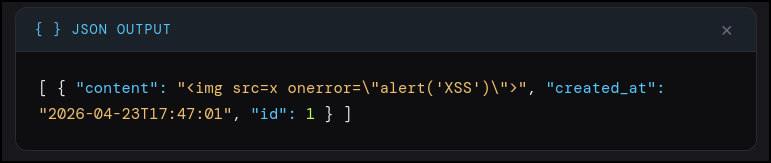
Notice the escaped quotes (\”). This is JSON serialization, not security filtering. JSON requires double quotes inside strings to be escaped so the format remains valid. When JavaScript parses this back, it reconstructs the original unescaped string perfectly.
JSON is safe here because it is a data format, not a rendering format. The browser displays it as plain text — there is no HTML parsing context, so there is nothing to execute.
2. Safe HTML: Output Encoding
The </> HTML button renders the same data as an HTML table, but passes each value through an escHtml() function first:
function escHtml(s) {
return s.replace(/&/g,’&’)
.replace(/</g,’<’)
.replace(/>/g,’>’)
.replace(/”/g,’"’);
}
This converts < to < and > to >. The browser renders these as visible characters rather than HTML tags. The payload is displayed on screen as literal text: <img src=x onerror=”alert(‘XSS’)”>. Harmless.
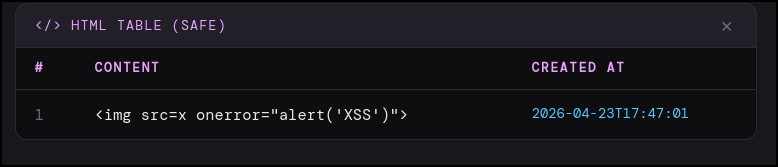
The database still holds the raw payload. It was not cleaned, not modified, not sanitized. The safety comes entirely from encoding at the render layer.
3. Unsafe HTML: XSS Executes
The UNSAFE button skips escHtml() entirely and injects the raw value straight into the DOM:
`<td>${e.content}</td>` // no escaping
The browser parses this as real HTML. It sees <img src=x onerror=”alert(‘XSS’)”>, tries to load a nonexistent image, triggers the onerror handler, and executes alert(‘XSS’). A dialog box appears from 127.0.0.1:5000 confirming the script ran in the page context.
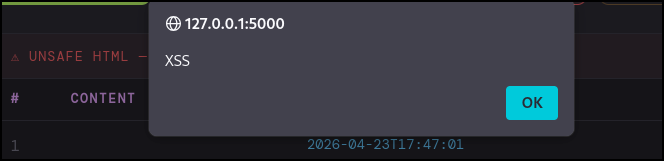
This is stored XSS. The payload was written once. It will fire for every user who views the page in unsafe mode until the data is deleted.
The Real Lesson
The vulnerability is not in the database. The database stored what it was given. The vulnerability is in the render layer specifically, passing user-controlled data to innerHTML without encoding it first.
This has an important implication: sanitizing input is not a substitute for encoding output. Even if you scrub input aggressively, you can’t anticipate every output context. Data that’s safe to display in one context might be dangerous in another. HTML, JavaScript, SQL, shell commands, and URLs all have different injection risks and require different escaping strategies.
The correct mental model is: trust nothing from storage, encode everything at render time, and match your encoding to the output context.
Try It Yourself
The full source is on GitHub. It runs on Linux with Python 3 and MariaDB. Setup takes about five minutes:
sudo apt install mariadb-server -y && sudo service mariadb start
sudo mysql -u root < setup.sql
python3 -m venv venv && source venv/bin/activate
pip install -r requirements.txt
python app.py
Then open http://localhost:5000, paste the attack string, and click through all three buttons. Seeing it execute and then seeing the safe render right next to it makes the concept stick in a way that reading about it never quite does.
This project is intentionally vulnerable. Run it only on localhost or in an isolated lab environment.
Get the Code
The full project, Flask backend, MySQL setup script, and the frontend with all three render modes, is available on my GitHub:
https://github.com/sup3rDav3/MySQL_PoC
The README includes the XSS payloads, step-by-step setup instructions, screenshots of all three output modes, and an explanation of why JSON shows escaped quotes while the raw database value does not. Clone it, run it, break it.
If you find it useful or have questions, feel free to open an issue or leave a comment below.